


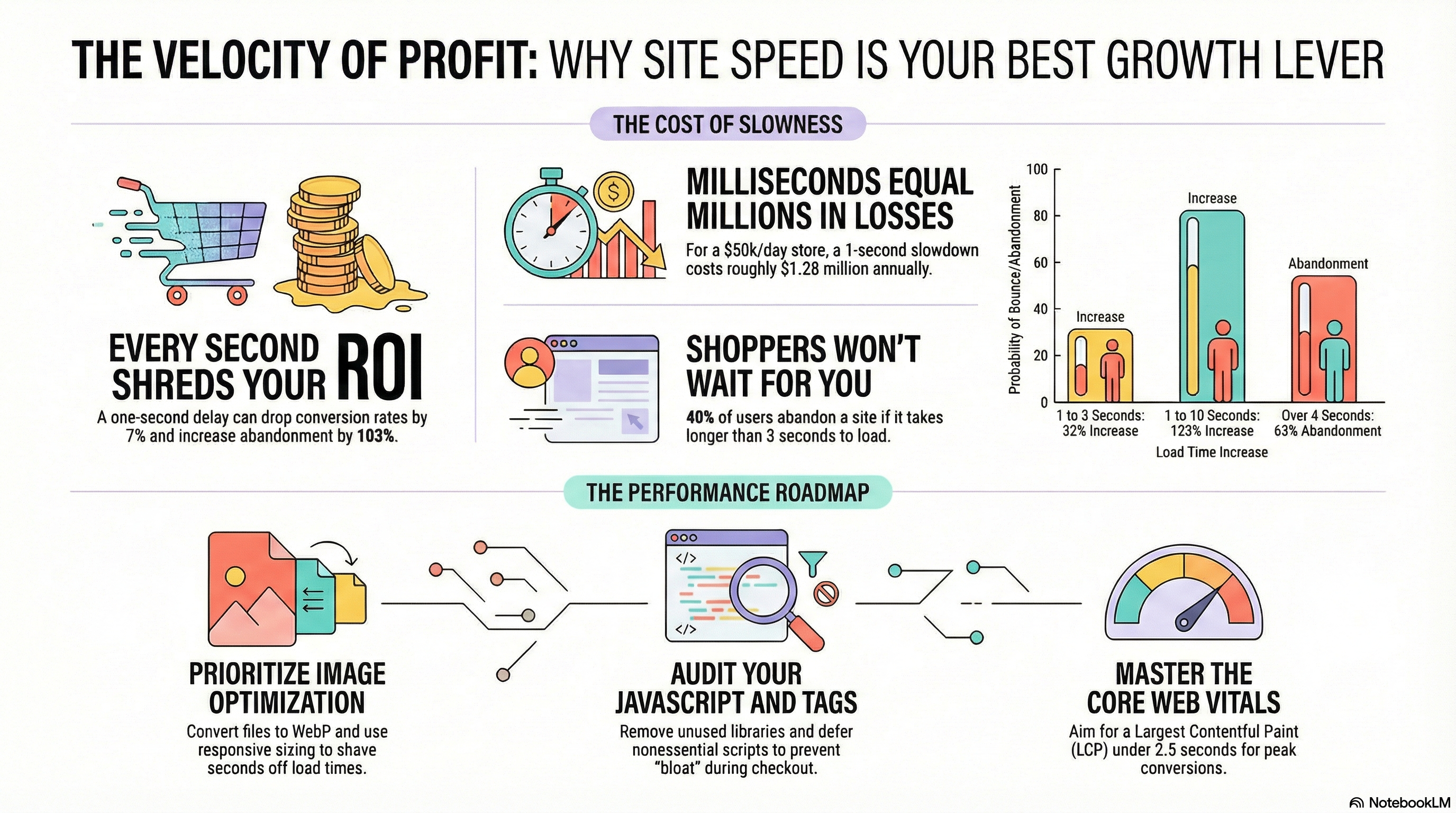
Every click into your store carries revenue potential. If your ecommerce site speed lags, you burn that potential before shoppers even see your products. Fast sites convert, slow sites leak money. Google has found that when page load time jumps from 1 to 3 seconds, the chance of a bounce increases by 32%. Stretch that to 10 seconds and abandonment jumps by 123 percent. Your performance is not a technical side project. It is a direct driver of sales, margin, and customer lifetime value.
You invest in paid media, merchandising, email, and loyalty. If your website performance ecommerce experience stalls under load, each of those investments returns less than it should. This is where ecommerce site speed becomes a competitive weapon and a core lever in conversion rate optimisation. Faster load times turn more sessions into carts, more carts into orders, and more orders into repeat customers.
The Direct Relationship Between Speed & Sales
Ecommerce site speed has a linear relationship with revenue. Amazon reported that every 100 milliseconds of extra latency reduced sales by about 1 percent, while Walmart found that each 1‑second improvement in load time increased conversions by up to 2 percent. This is not theory. It is hard revenue tied to milliseconds.
Independent research also links a 1‑second delay in page load to a 7 percent drop in conversion rate. If your store processes 50,000 dollars per day, one widely cited model estimates that a 1‑second slowdown can cost about 1.28 million dollars in lost conversions per year. Slow website revenue loss compounds over time. Every campaign you run through a slow funnel erodes ROI.
When you shift focus to performance, the inverse is also true. Vodafone improved load speed by 31 percent and saw an 8 percent increase in sales and a 15 percent lift in lead‑to‑visit rate. Brands that tighten site performance gain more revenue from the same traffic. That is the core business case for treating ecommerce site speed as a strategic metric, not a one‑time technical fix.
How Users React to Slow-Loading Stores
Shoppers do not wait for pages to sort themselves out. They back up to search results or move to a competitor tab. Across many studies, roughly 47 percent of users expect a page to load in 2 seconds or less, and about 40 percent abandon if it takes more than 3 seconds. Yottaa data shows 63 percent of shoppers abandon pages that take longer than 4 seconds to load.
That behavior hits every part of your funnel. Shoppers drop from category pages before product tiles render. They abandon PDPs before images load. They quit during checkout when forms lag or buttons feel unresponsive. Even a 2‑second delay can increase abandonment rates by 103 percent. When users experience slow pages, they do not complain. They leave.
The impact does not end with that one lost session. Around 44 percent of online shoppers share bad digital experiences with friends and family. Performance problems erode brand trust and depress repeat visits. Fast experiences, in contrast, feel effortless and reliable. That reliability builds confidence in your store and your fulfillment promises.
Speed vs Conversion: What the Data Shows
The link between page speed conversion rate is measurable at scale. Analysis of Core Web Vitals and ecommerce results shows that a 0.1‑second improvement in load time can increase conversions by 8.4 percent and average order value by 9.2 percent, while reducing bounce rates by 8.3 percent. That small shift in ecommerce site speed pays off across the entire customer journey.
For product pages, the relationship is even sharper. Data from performance audits indicates that product pages with a 2‑second Largest Contentful Paint see 40 to 50 percent higher conversion rates than the same pages with a 4 to 5 second LCP. When your core web vitals ecommerce metrics land in the “good” range, you turn more product views into add‑to‑carts and orders without changing your merchandising or pricing.
On mobile, performance carries extra weight. A study referenced by Google and partners shows that a 1‑second improvement in mobile load time drives about a 3 percent lift in conversions. With mobile often driving the majority of traffic, that lift quickly rolls into six or seven figures for mid‑market merchants.
Pages Where Speed Matters the Most
Every page load contributes to your overall website performance ecommerce profile, but some templates have higher revenue sensitivity. These deserve priority attention from your team and platform partners.
Home and Landing Pages
Homepages and campaign landers carry your first impression. If your hero imagery, navigation, or core offer blocks load slowly, you lose the visitor before they see any merchandising. These pages also drive internal navigation. A slow home or landing page drags down engagement with every other section of your store.
Category and Search Results Pages
Shoppers arriving with intent want to scan inventory fast. Filter controls, pagination, and product tiles need to load and respond quickly. Heavy scripts for sorting, tracking, and personalization often weigh these pages down. That weight shows up directly in lower page speed conversion rate metrics for visitors who browse multiple categories.
Product Detail Pages
PDPs are where ecommerce site speed and content quality intersect. Large, unoptimized images, embedded reviews, 3D viewers, and recommendation widgets often compete for bandwidth. Every extra second here reduces the chance of an add‑to‑cart and drives slow website revenue loss. Product pages sit at the center of performance work for growth teams.
Cart and Checkout
Cart and checkout flows carry the highest revenue impact per millisecond. Any delay between pressing “checkout” and seeing the next step adds risk. Third‑party scripts for tax, shipping, fraud, and marketing tags often stack up here. When these scripts block rendering or interactivity, shoppers get stuck, reload, or give up. That shows up as cart abandonment, not “technical issues” in your analytics.
Common Causes of Poor Store Performance
Once you accept that ecommerce site speed is a revenue metric, you need to pinpoint why your store feels slow. Most performance issues fall into a few repeatable categories.
Heavy Images and Media
Oversized hero images, lifestyle photography, and uncompressed product images are frequent offenders. High resolution without compression punishes mobile and low‑bandwidth users. Auto‑playing background video and large carousels extend load times and eat CPU on weaker devices.
Too Much JavaScript
Modern storefronts rely heavily on JavaScript for personalization, analytics, A/B testing, and chat. Over time, each new tool adds scripts that compete for processing. Long tasks in the main thread block input and delay visual updates. This hurts your Interaction to Next Paint score and creates a laggy feel during scrolling and checkout.
Bloated Third‑Party Tags
Pixels, trackers, and tag manager containers tend to grow without strong ownership. Each extra tag contributes to slower requests, layout shifts, and higher CPU usage. Tags injected late in the project often load synchronously or run on every page view, even when they add little value.
Underpowered Hosting and Caching
If your infrastructure responds slowly to the first byte request, every page load starts behind. Lack of edge caching, misconfigured CDNs, and chatty backend services lead to high server response times. Spikes during promotions expose these weaknesses and create noticeable slowdowns when you need performance the most.
Poor Core Web Vitals Hygiene
Layout shifts from popups and banners, unreserved space for images, and late loading fonts all reduce your core web vitals ecommerce scores. These issues do not always come from heavy content. Often they come from small front‑end choices, such as how you place consent banners, promo bars, and sticky headers.
High-Impact Speed Improvements
You do not need a full rebuild to improve ecommerce site speed. You need focused work on the elements that block rendering and interactivity. Start with changes that move your Core Web Vitals from “poor” or “needs improvement” into the “good” range.
Optimize Images First
• Convert product and hero images to modern formats like WebP.
• Add responsive image sizing so mobile devices avoid desktop‑sized files.
• Lazy‑load below‑the‑fold images, but avoid delaying above‑the‑fold content.
For many stores, image work alone can shave 1 to 2 seconds from Largest Contentful Paint on key templates.
Trim and Prioritize JavaScript
• Audit all scripts and remove unused libraries and legacy tags.
• Defer nonessential JavaScript and load it after first paint.
• Split bundles so critical UI loads fast and feature scripts load later.
Focus especially on cart and checkout. Every extra script there eats into your page speed conversion rate at the highest value point in the funnel.
Control Third-Party Tags
• Use a tag manager with strict governance and approvals.
• Load marketing and analytics tags asynchronously.
• Limit tag execution to templates where each tag adds clear value.
Treat third‑party code like any other vendor. Each one should earn its place with measurable revenue impact, not wishful thinking.
Strengthen Core Web Vitals
• Improve LCP with better caching, CDNs, and reduced image weight.
• Improve INP by breaking up long tasks and reducing heavy event handlers.
• Improve CLS by reserving space for images, ads, and banners.
Studies across ecommerce stores show that optimizing Core Web Vitals can deliver up to 30 percent higher conversion rates and up to 9.2 percent higher average order value. Strong vitals support both your SEO and your paid media efficiency.
Measuring Speed Improvements Correctly
You cannot manage ecommerce site speed without reliable measurement. That means pairing lab data tools with real user metrics and tying all of it back to revenue.
Use Both Lab and Field Data
• Use tools like Lighthouse or WebPageTest to identify technical issues.
• Use real user monitoring to see Core Web Vitals for actual customers.
Lab tests help engineers pinpoint specific blockers. Field data tells you what your shoppers experience across device types, networks, and regions.
Track Speed as a Revenue Metric
• Segment conversion rate by load time buckets.
• Measure average order value and abandonment against Core Web Vitals tiers.
• Run A/B tests where one variant ships performance changes only.
Research that grouped sites by Core Web Vitals performance found that those passing all metrics showed stronger engagement and higher conversion, even when ranking advantages were controlled. When you connect speed metrics to revenue, you can justify performance work alongside new feature development.
Make Speed an Ongoing Discipline
Performance decays if you treat it as a project. New campaigns add scripts. New features add components. New vendors add tags. You need a clear owner for ecommerce site speed, transparent dashboards, and performance budgets for each template. That discipline keeps your store fast as your stack and your business grow.
FAQs
1. How fast should my ecommerce site load?
Aim for under 2 seconds to first meaningful paint on key pages and under 2.5 seconds for Largest Contentful Paint on both mobile and desktop. Once you push beyond 3 seconds, bounce and abandonment rise sharply, and your page speed conversion rate drops.
2. Which metrics matter most for ecommerce site speed?
Focus on Core Web Vitals LCP, Interaction to Next Paint, and Cumulative Layout Shift. These capture how quickly content appears, how fast the site responds to input, and how stable the layout feels. Together, they describe the performance experience that shapes revenue outcomes.
3. How do I know if slow pages are causing revenue loss?
Segment analytics by page load time. Compare conversion rates, average order value, and abandonment for sessions with fast loads versus slow loads. If slower sessions convert at lower rates, you have direct evidence of slow website revenue loss and a clear business case for performance work.
4. Do all pages need the same level of optimization?
No. Prioritize templates closest to revenue. Start with product pages, cart, and checkout, then move to category, home, and core content. Still, enforce basic performance standards across the entire site so shoppers never hit an unexpected bottleneck.
5. How often should I audit my ecommerce site speed?
Review performance at least quarterly and after any major launch, theme change, or vendor addition. Build simple dashboards so your team sees Core Web Vitals, conversion rate, and revenue impact on an ongoing basis, not only during crises.
If your current platform or tech stack makes ecommerce site speed improvement difficult, you need a partner built for high performance. CV3 is designed for serious eCommerce growth teams that want fast, stable, conversion‑ready storefronts without sacrificing flexibility. If you want to stop losing revenue to slow pages and turn speed into a competitive edge, talk to CV3 about a performance‑focused eCommerce platform.